
The short answer
A company-wide furniture standard defines the approved furniture, configurations, finishes and technical interfaces that every office should use. Build it from repeatable work settings, then add approved alternatives and a controlled exception process for local building conditions, user needs and IT/AV constraints.
Key takeaways
- Define the rooms and tasks the standard must support before selecting products.
- Keep a common core specification, an approved alternatives list and a formal exception route.
- Record dimensions, configuration, finish, warranty territory and replacement rules for every item.
- Make IT and AV requirements part of the furniture schedule before procurement issues orders.
- Pilot the standard, measure installation defects and user fit, then review it on a fixed cycle.
In this article
- What does a company-wide furniture standard include?
- What should procurement prepare before starting?
- How do you create a company-wide furniture standard in seven steps?
- How should the standard work across Almaty and Astana offices?
- How should procurement compare cost, schedule, warranty, ergonomics and productivity?
- How should IT and AV requirements appear in the specification?
- How should procurement handle substitutions and local exceptions?
- How do you measure whether the standard is working?
- What should you do next?
A company with teams in Almaty and Astana may have inherited two different ways of buying an office. One site orders desks by model name. Another uses a finish description from an old tender. Chairs that look similar have different adjustment options, and meeting tables arrive with different cable access.
The variations create work for procurement, facilities, IT and anyone replacing a damaged or discontinued item. A new office repeats the specification exercise. A service team trying to standardise equipment has to find out what was purchased at each location.
A company-wide furniture standard gives the organisation one controlled reference for what to buy, where it fits and how changes are approved. The method below is designed for procurement teams coordinating several locations in Kazakhstan. It also gives architects, HR and IT/AV a defined place in the approval process. The broader Office Design workplace planning and furnishing services can be discussed where a project needs external planning input. The solutions by space overview gives a separate view of the room types that may sit inside the standard.
Good office furniture procurement needs a written rule for each repeated setting. For multi-site office furniture, use the same item record at every site. These office furniture standards help teams compare corporate office furniture in Kazakhstan. Keep all changes in one company-wide office furniture specification.
What does a company-wide furniture standard include?
A company-wide furniture standard lists approved products and their configurations. It records finishes, dimensions and rules for each work setting. It states where each item belongs, what may replace it and who can approve a change. Procurement, facilities, designers and technical teams should all be able to use it.
A practical standard has three layers. The first is the common core: the furniture and requirements that should stay consistent across offices. The second is the approved alternatives list: products that meet the same defined performance and dimensional requirements. The third is the exception route for conditions that cannot be handled by the core or its alternatives.
This structure keeps the standard useful when a building has a narrow lift, a different floor plate or a room with unusual power locations. It also prevents an informal substitution from becoming a new standard without anyone recording the decision.
The three layers of a company standard
|
Layer |
What it contains |
Who controls it |
|
Common core |
Approved product family, configuration, size, finish and room use |
Procurement with workplace design and user representatives |
|
Approved alternatives |
Pre-approved equivalent options with exact criteria |
Procurement and technical approvers |
|
Exceptions |
Site-specific deviations with reason, evidence, owner and expiry or review date |
Named standard owner and relevant approvers |
The standard should also point to source documents: product data sheets, drawings, finish samples, warranty terms, installation instructions and the current bill of quantities. Store these in one controlled location. A PDF attached to an old email is not a procurement system.
A product code is a better memory aid than the phrase “the one we bought last time”.
For a chair example, record the Herman Miller Aeron size and configuration. List each option and accessory in the approved product schedule. Assess the Herman Miller Mirra 2 against the same criteria if it is under review. Check that the Aeron headrest accessory fits the selected chair. Include it only when the specification requires it.
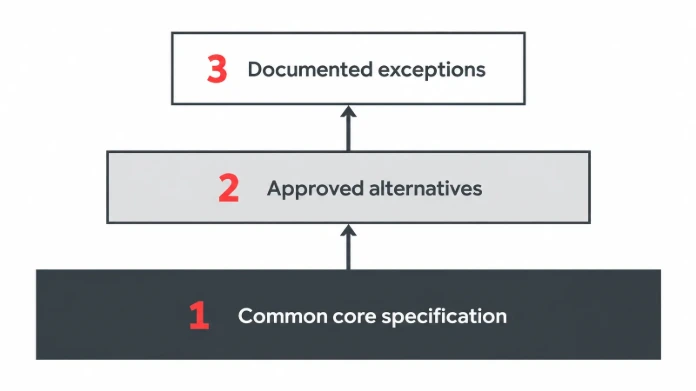
A common core sets consistency while approved alternatives and exceptions handle genuine differences.
What should procurement prepare before starting?
Before selecting furniture, procurement needs a scope that describes the organisation, locations, users, room types and buying constraints. The team should know which items are recurring, which are site-specific and which depend on IT/AV. A clear scope prevents a product catalogue from becoming the starting point for a workplace strategy.
Create a location register for each office. Include the city, site contact, floor, planned capacity, room types, access restrictions, building rules and intended occupancy date. Record local building constraints in the same file so procurement can compare each site against the common rule. Add the current furniture inventory if one exists. Mark any source data that is incomplete or unverified.
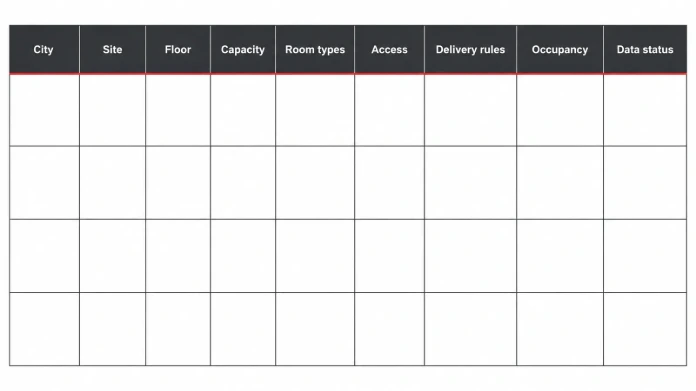
One register lets procurement check every office against the same scope.
Then map the people who will approve the standard. Procurement owns commercial rules and supplier documentation. Facilities owns building access, maintenance and replacement needs. Workplace design owns layouts and user settings. IT/AV owns technical interfaces. HR and team leaders can clarify work patterns and user requirements.
- List every office and the current project stage for each location.
- Count the work settings required, alongside the number of employees.
- Collect existing furniture lists, drawings, finish references and service records.
- Identify the approver for product selection, technical compatibility and exceptions.
- Set the budget approval route and the document version that procurement will use.
- Record target occupancy dates and the dependencies that affect ordering and installation.
A company should decide whether the standard applies to all offices immediately or starts with a defined group. A first release might cover standard workstations and meeting rooms, while specialist training rooms or executive suites follow later. Define the boundary in writing so local teams know what is included.
For a workplace programme with several room types, use one plan register for the organisation. The Living Office workplace framework can be a reference when mapping activities to settings, but local plans still need a site check. The Office Design projects overview can be a starting point for discussing the kinds of corporate environments shown by the company. Do not infer project quantities, locations or outcomes from the page without checking each case and its current approval status.
Then map the people who will approve the standard. Procurement owns commercial rules and supplier documentation. Facilities owns building access, maintenance and replacement needs. Workplace design owns layouts and user settings. IT/AV owns technical interfaces. HR and team leaders can clarify work patterns and user requirements.
- List every office and the current project stage for each location.
- Count the work settings required, alongside the number of employees.
- Collect existing furniture lists, drawings, finish references and service records.
- Identify the approver for product selection, technical compatibility and exceptions.
- Set the budget approval route and the document version that procurement will use.
- Record target occupancy dates and the dependencies that affect ordering and installation.
A company should decide whether the standard applies to all offices immediately or starts with a defined group. A first release might cover standard workstations and meeting rooms, while specialist training rooms or executive suites follow later. Define the boundary in writing so local teams know what is included.
For a workplace programme with several room types, use one plan register for the organisation. The Living Office workplace framework can be a reference when mapping activities to settings, but local plans still need a site check. The Office Design projects overview can be a starting point for discussing the kinds of corporate environments shown by the company. Do not infer project quantities, locations or outcomes from the page without checking each case and its current approval status.
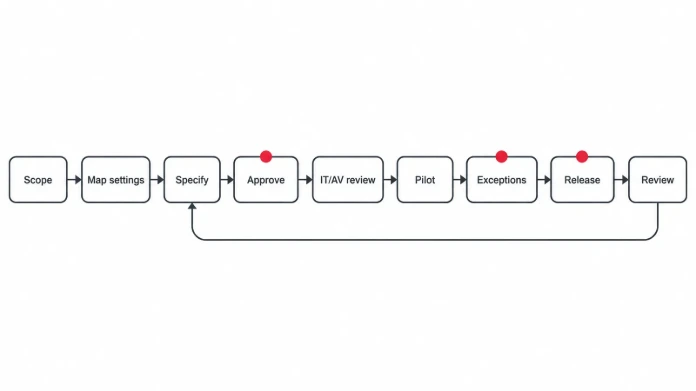
A named owner and version history keep each change traceable.
- Set the business rules and scope.
- Map work settings and user groups.
- Define the core furniture specification.
- Set finishes, configurations and approved alternatives.
- Add IT and AV interface requirements.
- Pilot the standard in one representative office.
- Govern roll-out, exceptions and review.
Step 1: Set the business rules and scope
Write an objective that procurement can test. The organisation may set one approved workstation for most office teams. It may set one finish family for shared areas. It may also set one replacement route, so each order does not need a new design review.
Set the fixed rules first. They may cover dimensions, finish, cable access, warranty records and product codes. Other details can change by site, such as desk direction, floor quantity or storage layout.
Keep a finish schedule with the approved colour, material, texture and supplier reference. A finish sample can look settled on a screen and different under the office lights. Record the sample approval and revision so the next site does not work from an old image.
Step 2: Map work settings and user groups
Map the settings before writing a shopping list. A company may need individual workstations, shared desks, meeting rooms, focus spaces, reception and storage. Agree the work settings and criteria before browsing the product catalogue. Each setting supports different tasks and has different furniture and technical interfaces.
For each setting, record the user group, activity, occupancy pattern, room area, adjacencies, privacy needs and equipment. A quiet focus room has a different brief from a collaborative project table. A video meeting room needs screen visibility, sound control and connection access.
Herman Miller’s planning ideas are organised around workplace settings and include digital planning resources. Use those resources as design references, then adapt the plan to the organisation’s own headcount, floor plate, local building rules and IT/AV brief. See Herman Miller planning ideas.
Step 3: Define the core furniture specification
Create a record for each approved item. Use a product code or exact model if available. Record size, configuration, finish, material, dimensions and accessories. Add packing details and the documents a buyer needs. Avoid broad colour names or generic product labels.
For chairs, list the required adjustments and configuration. For desks, record the top size, height range, cable access and frame. For storage, record the opening direction, lock, drawers and footprint. For meeting furniture, list cable ports, power modules and the planned number of seats.
A product specification should let another buyer reorder the approved item without guessing which option was intended. The office desk range, the office chair range and the Herman Miller brand range can be used as catalogue references after the product criteria are agreed. Confirm exact model and configuration in the purchase documentation.
Step 4: Set finishes, configurations and approved alternatives
Choose a small finish palette that works with the organisation’s interior and maintenance policy. Record the actual manufacturer finish name or code, sample reference and acceptable variation. A colour that looks similar on a screen may look different under the office lighting or beside another material.
Define an alternative with clear tests. An equivalent chair should match user fit, adjustment range, size, material, warranty territory and required documents. An equivalent desk should keep the approved footprint, height and cable access.
A standard that says “black chair” leaves procurement with a colour name and a surprisingly large decision. Attach approved samples and product references. When a product is discontinued, the standard owner should assess the replacement against the same criteria and publish a new version.
Step 5: Add IT and AV interface requirements
IT and AV must approve the technical interfaces before the furniture specification is frozen. Record where power and data enter each workstation or table, how cables are routed, what display mount is required and where equipment will sit. Confirm load, dimensions, access and ventilation requirements with the responsible technical team.
For meeting rooms, describe the screen location, viewing direction, camera position, microphones, speakers, control interface and connection points. The furniture plan should reserve the space and access required by the equipment. A display specification without a wall or mounting check is incomplete.
Manufacturer data can add details missing from a short catalogue entry. Framery Six technical information lists dimensions, weight, display and connectivity options. Confirm the model and configuration before adding those details to the local standard. See Framery Six technical specifications.
For an ergonomic chair reference, the Herman Miller Aeron specification page shows why a product name alone is insufficient: size and configuration details need to be part of the schedule. Record the selected size and options for the specific users and role. The exact product and local supply terms must be confirmed with the supplier.
Step 6: Pilot the standard in one representative office
Choose a pilot site that tests more than one typical workstation. It should include at least one meeting room and one setting with a technical dependency. A pilot can expose issues with dimensions, finishes, access, cable routing, assembly sequence and user fit before the company releases a larger order.
Ask users and site teams to review the installed setting against the specification. Record missing items, damaged parts, fit issues, technical defects, finish variation and maintenance concerns. Separate a product problem from an installation or building problem. The remedy and owner will differ.
A pilot is complete when procurement can reorder the approved configuration, facilities can maintain it and IT/AV can support the installed equipment. Keep a record of accepted changes and update the standard before the next office begins procurement.
Step 7: Govern roll-out, exceptions and review
Publish the approved version with an owner, revision date, effective date and change log. Give procurement a controlled product schedule and give local project teams the same reference. Suppliers should receive the current version with each request for quotation.
Define who can approve a deviation. A local facilities manager may confirm building access, while IT/AV confirms technical compatibility and procurement checks commercial impact. A major change to product family, finish or workplace function should return to the standard owner for approval.
The exception register is where a one-off decision gets a name, an owner and a route back into the standard. Add the site, item, reason, evidence, cost effect, approver, expiry or review date and the decision. Review repeated exceptions. If three offices need the same variation, it may belong in the next standard release.
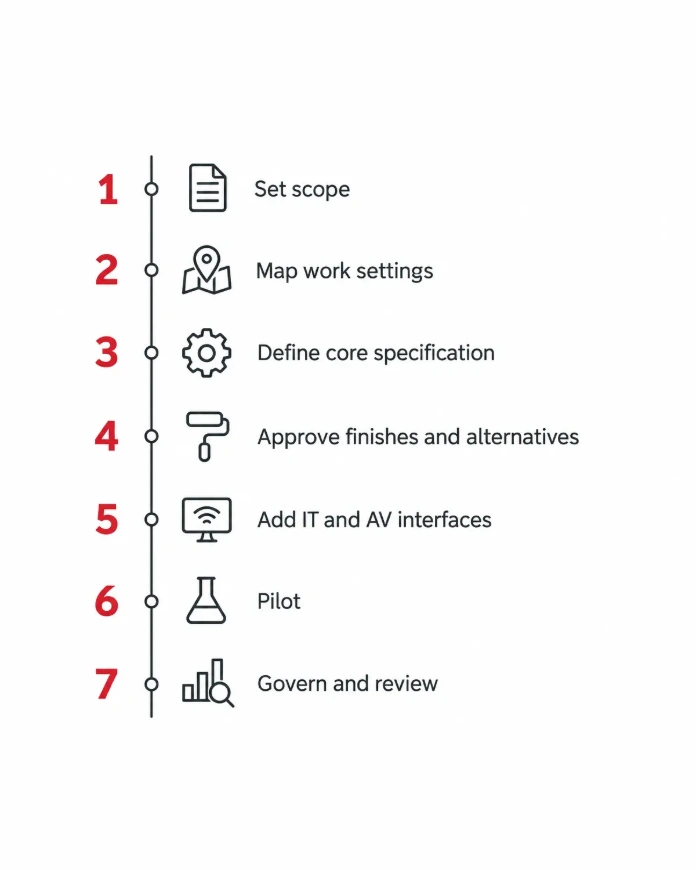
Use the same sequence for the first office and each later location.
How should the standard work across Almaty and Astana offices?
Use one common specification across Almaty and Astana, then allow documented site adjustments for floor plates, building access and local technical conditions. The product record should remain the same wherever possible. Any change to a product, finish or configuration should pass through the exception route and appear in the location register.
The city example is a planning scenario, not a statement about Office Design’s service coverage. A company may operate both offices while using one procurement team and one design authority. The team should check the building rules at each location before confirming delivery or installation arrangements.
Common specification and local adaptation
|
Specification element |
Keep consistent |
Allow local review for |
|
Product identity |
Model, configuration, finish and approved supplier documentation |
Discontinued model or approved equivalent |
|
Work setting |
Task, room purpose and user requirements |
Room area, adjacency and occupancy pattern |
|
Dimensions |
Standard footprint and required clearances |
Lift, door, corridor and wall constraints |
|
IT/AV interfaces |
Power, data, mount and cable performance |
Existing outlets, wall construction and network design |
|
Delivery and installation |
Handover records and acceptance criteria |
Building slot, access route, local contractor and scope |
|
Warranty |
Written territory, period and claim process |
Local service route and country-specific exclusions |
The standard should include a site survey record for each new location. Capture dimensions and access before ordering. A plan that fits the head office but not the lift is still a plan, just not a deliverable one.
Where a site requires a different room arrangement, adjust the layout first and preserve the approved furniture specification if it still fits. If the product must change, document the reason and compare the alternative against the core criteria. Avoid allowing a local purchase to bypass the master schedule.
An “equivalent finish” can remain an open question for longer than the furniture order if nobody defines the match.
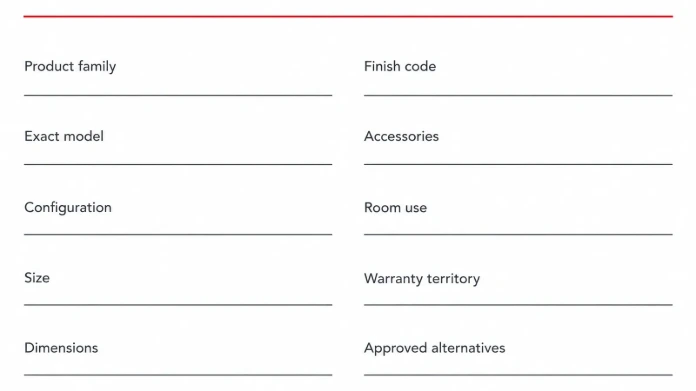
A buyer should be able to reorder the approved item without guessing at its configuration.
How should procurement compare cost, schedule, warranty, ergonomics and productivity?
A company-wide standard should be assessed on five dimensions together. Procurement needs the purchase price and total cost of ownership, the schedule, written warranty terms, ergonomic fit and the work each setting supports. Apply the same questions to the core option and every approved alternative.
Price and total cost of ownership
Compare the product price with delivery, unloading, assembly, installation, spares and replacement. Add maintenance and the cost of holding several configurations. Fewer variants may make replacement easier. Measure the effect using the organisation’s own purchase data.
For each product, record the warranty period, exclusions, territory, parts and labour coverage, and claim route. The MillerKnoll brand information identifies the brand family. Herman Miller’s published warranty and service terms describe a 12-year limited warranty for many products. Terms vary by region. The page includes United States and Canada conditions. Do not apply them to Kazakhstan without written confirmation for the exact product.
Schedule and ordering
Use the same approval steps for every office. Sign off the brief and drawings. Fix the product configuration before the order is released. Confirm site access, receive the goods, complete installation and accept the room. For Herman Miller and MillerKnoll orders from Europe, plan about 70 days for ordering and delivery from Europe. Ask Office Design to confirm the installation allowance for each project.
A repeatable standard can reduce time spent on product selection, but it does not remove the need for current stock, order confirmation, building access or a local installation plan. Keep the dates in the project schedule as confirmed or pending. Do not treat an estimated procurement date as an arrival commitment.
Warranty and service
Keep a warranty statement for each product. It should name the issuing entity, country or territory, start date, duration, covered parts, exclusions and claim contact. Ask who provides service in Kazakhstan and how parts are obtained. Put this page in the product approval pack before procurement starts.
When a product is replaced or discontinued, check whether the new item retains the same warranty territory and support route. A specification that lists only the brand name cannot answer those questions. Keep the original written terms with the order record.
Ergonomics and user fit
Define fit requirements by user group and task. The workstation standard should cover desk dimensions, monitor position, chair adjustment and available movement. Where roles have different tasks or users have specific fit needs, define approved configurations that can be selected without bypassing the standard.
A pilot should test real use. Ask users to adjust the chair and desk, reach the equipment and work through a normal task. Record the setup and the adjustments required. Do not use a generic product label as evidence that the setting suits every person.
A pilot is cheaper than learning the same lesson in every office.
Productivity and task support
Describe productivity through work the setting enables. A meeting room should support clear sightlines, reliable audio and usable connections. A focus setting should provide the level of privacy the brief requires. A workstation should allow the team to use its daily equipment and complete its tasks.
Track defects at handover, rooms released on time, repeat order accuracy, user fit issues and faults after occupancy. Set a baseline before rollout. Do not claim a fixed productivity gain unless the company measures it.
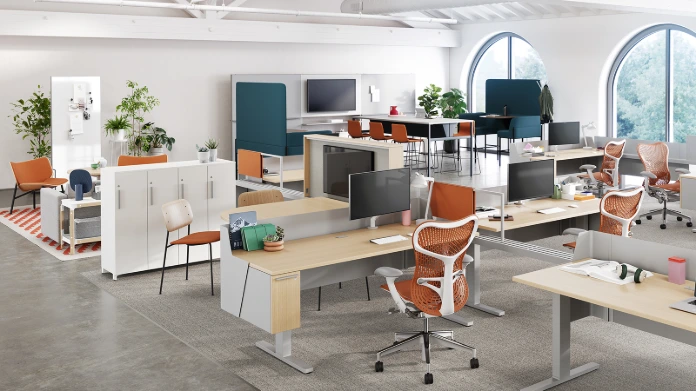
Use manufacturer planning resources as a starting point, then validate the plan against the local building and team brief.
Workplace specialist note
When I review a furniture standard, I look for the decision that a local team might make differently. The document should answer that question before the next order is placed. I also check that the furniture plan and the IT/AV schedule agree, because a consistent product is of limited use when the room cannot connect to its equipment.
Office Design Team, Workplace specialists, Office Design
Review the standard with a workplace specialist
Office Design can discuss furniture planning and workplace requirements with your procurement team. Ask which parts of the brief can be supported for each location, and record any delivery or installation scope only after it has been confirmed.
How should IT and AV requirements appear in the specification?
IT and AV requirements should be written into the product and room schedules as measurable interfaces. State where power and data are needed, how cables enter the furniture, what mounts are allowed and who signs off the installation. This avoids a furniture order that meets the visual brief but conflicts with the technical design.
Use a separate interface schedule for workstations, meeting rooms, collaboration spaces and enclosed booths. For each setting, record the device, mounting point, power requirement, data connection, cable route, clearance and testing owner. Identify any equipment that the furniture supplier does not provide.
IT and AV interface schedule
|
Setting |
Furniture requirement |
Technical requirement |
Approval owner |
|
Workstation |
Desk size, cable tray and screen arm compatibility |
Power, data, monitor and peripheral access |
IT plus workplace design |
|
Meeting room |
Table size, cable ports and equipment storage |
Display, camera, microphones, speakers and control |
AV lead plus facilities |
|
Focus room or booth |
Clearances, door swing and equipment shelf |
Power, ventilation and connectivity as specified |
Facilities plus IT/AV |
|
Training or collaboration |
Flexible table layout and storage |
Display sightlines, network and device charging |
Learning lead plus AV |
|
Reception |
Counter layout and concealed cable route |
Network, security and visitor systems |
Facilities plus IT |
For acoustic enclosures, confirm the exact model and configured options. Architects and design partners can also review the Office Design partnership programme when product and workplace decisions need shared review. The Framery and Silen booth range can help the team identify relevant product families. Manufacturer data should then be checked against local power, network, ventilation, room and access requirements. Do not assume that one model’s dimensions or connectivity applies to another.
A standards document should include a drawing and a checklist for technical acceptance. For business furniture context, see Herman Miller office solutions for businesses in Central Asia; confirm the scope for each destination separately. The sign-off should cover power and network availability, device mounting, cable management, audio and video testing, room control and user instructions. Store the final as-built drawing with the location record.
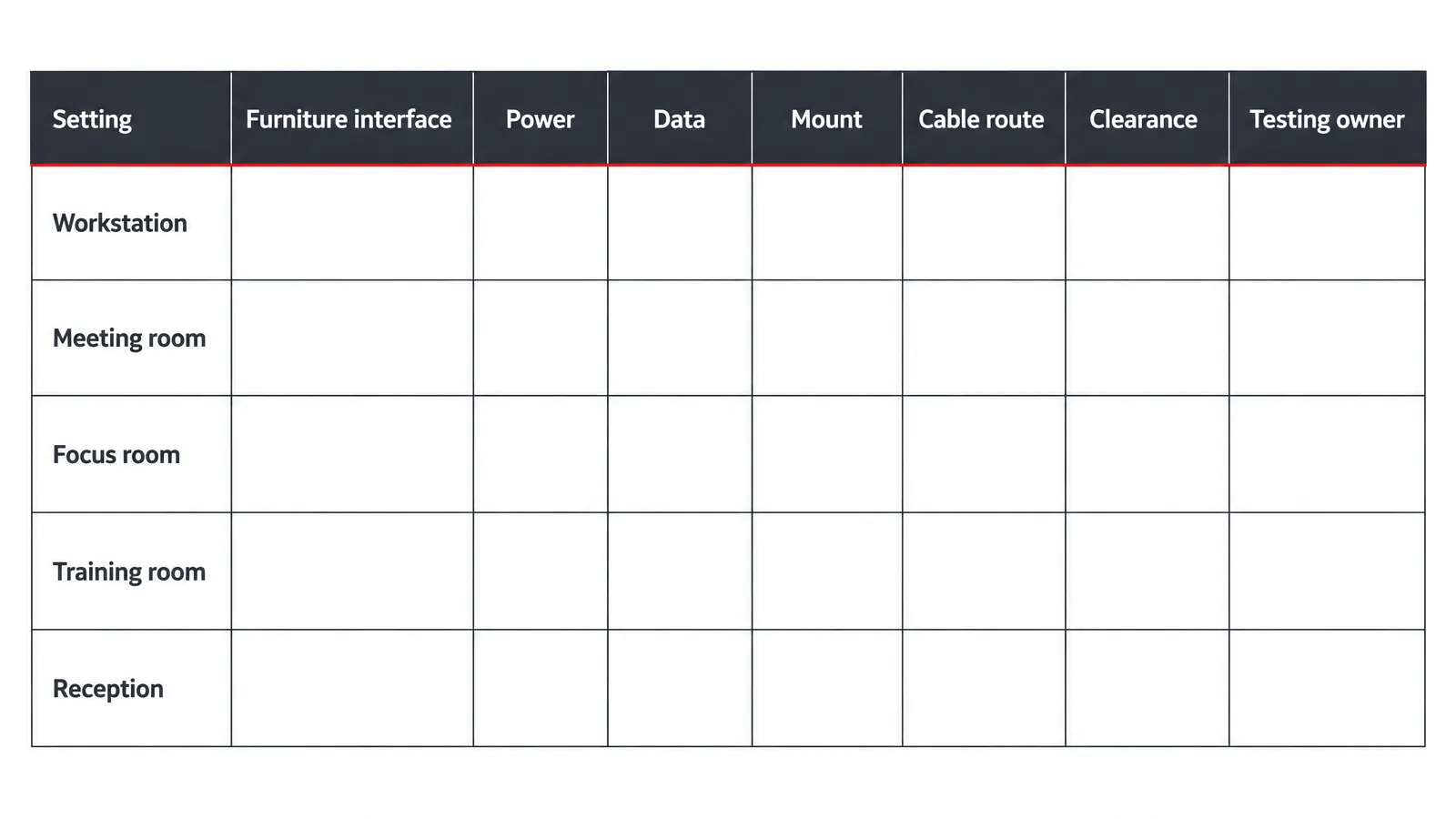
Technical requirements belong in the same controlled schedule as the furniture specification.
How should procurement handle substitutions and local exceptions?
Approve substitutions against written criteria and record every site exception. The requester should explain the constraint, provide evidence and identify the effect on cost, schedule, user fit and technical compatibility. The standard owner then accepts, rejects or asks for a revised option. This keeps temporary decisions from becoming permanent policy.
An alternative should be compared to the approved item across size, function, configuration, finish, warranty, serviceability and IT/AV interfaces. Where the brief includes Vitra (Switzerland) design furniture, document the exact product and finish in the same way. If one requirement cannot be met, record the reason and any compensating control. A product that looks similar in a sample image may differ in dimensions, material or cable access.
Exception approval record
|
Field |
What to enter |
|
Location and room |
City, building, floor and room reference |
|
Standard item |
Product code, configuration and revision |
|
Requested change |
Alternative product, finish or layout |
|
Reason and evidence |
Measured access restriction, technical constraint or user need |
|
Impact review |
Price, schedule, warranty, ergonomics and productivity |
|
Approvals |
Procurement, facilities, workplace design and IT/AV as required |
|
Decision and review |
Approved, declined or conditional; owner and review date |
Use expiry dates for temporary exceptions. A rented site or short-term project may need a different arrangement that should not automatically carry into the next office. A building constraint may be permanent, in which case the exception can be reviewed for inclusion in the next standard version.
If the same exception appears repeatedly, investigate the reason. The standard may be too narrow, the approved alternative list may be incomplete or project teams may not understand the rule. Review the pattern before adding a new product family.
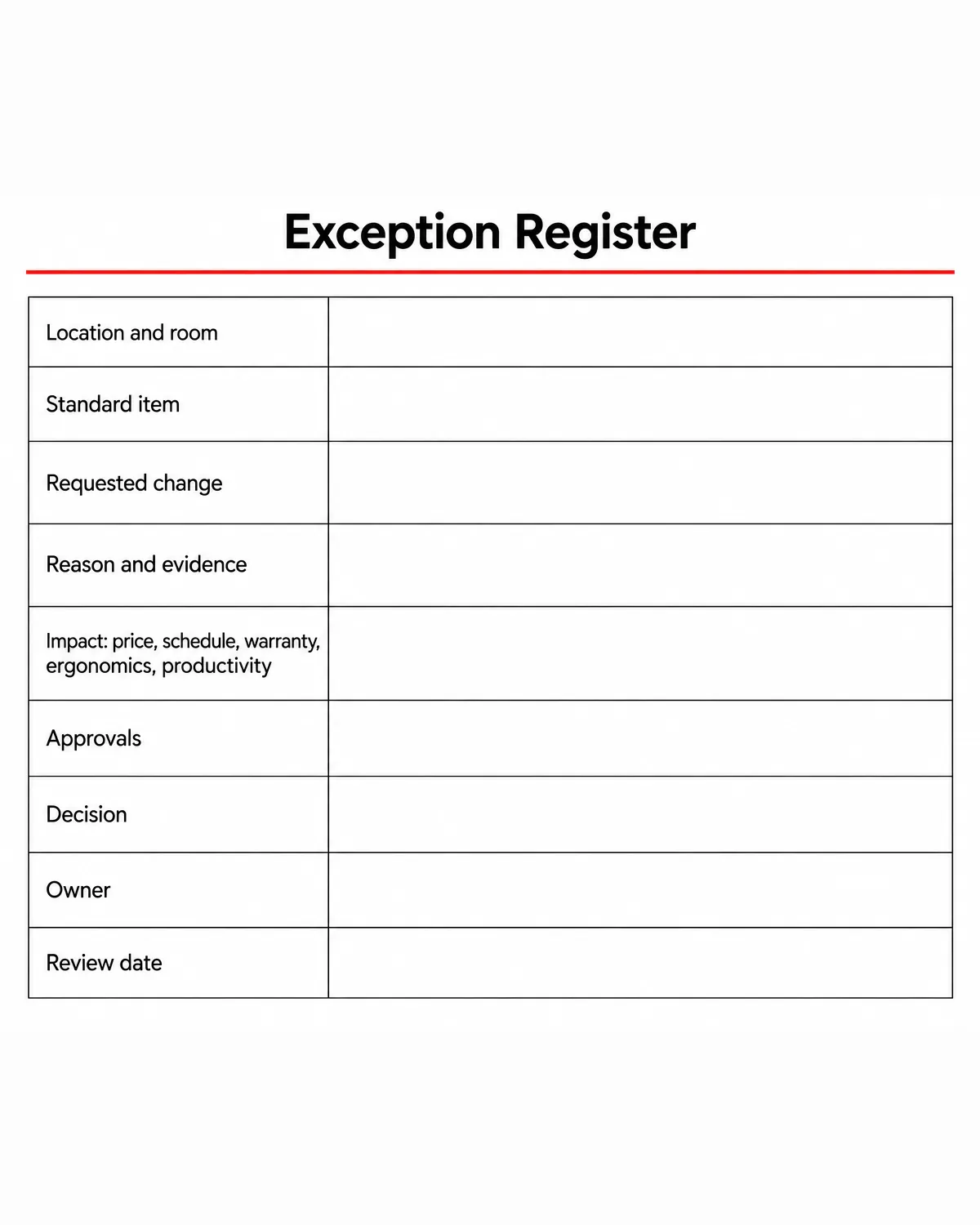
How do you measure whether the standard is working?
Use information the organisation already records to check adoption and results. Can teams order the approved configuration? Are rooms accepted with few open defects? Can users work with the equipment they need? Compare each result by location and room type.
Track a small set of measures every quarter or after each major installation. Use the same definitions across offices. An organisation can then see whether exceptions are falling, repeat orders are accurate and installation issues are being resolved before occupancy.
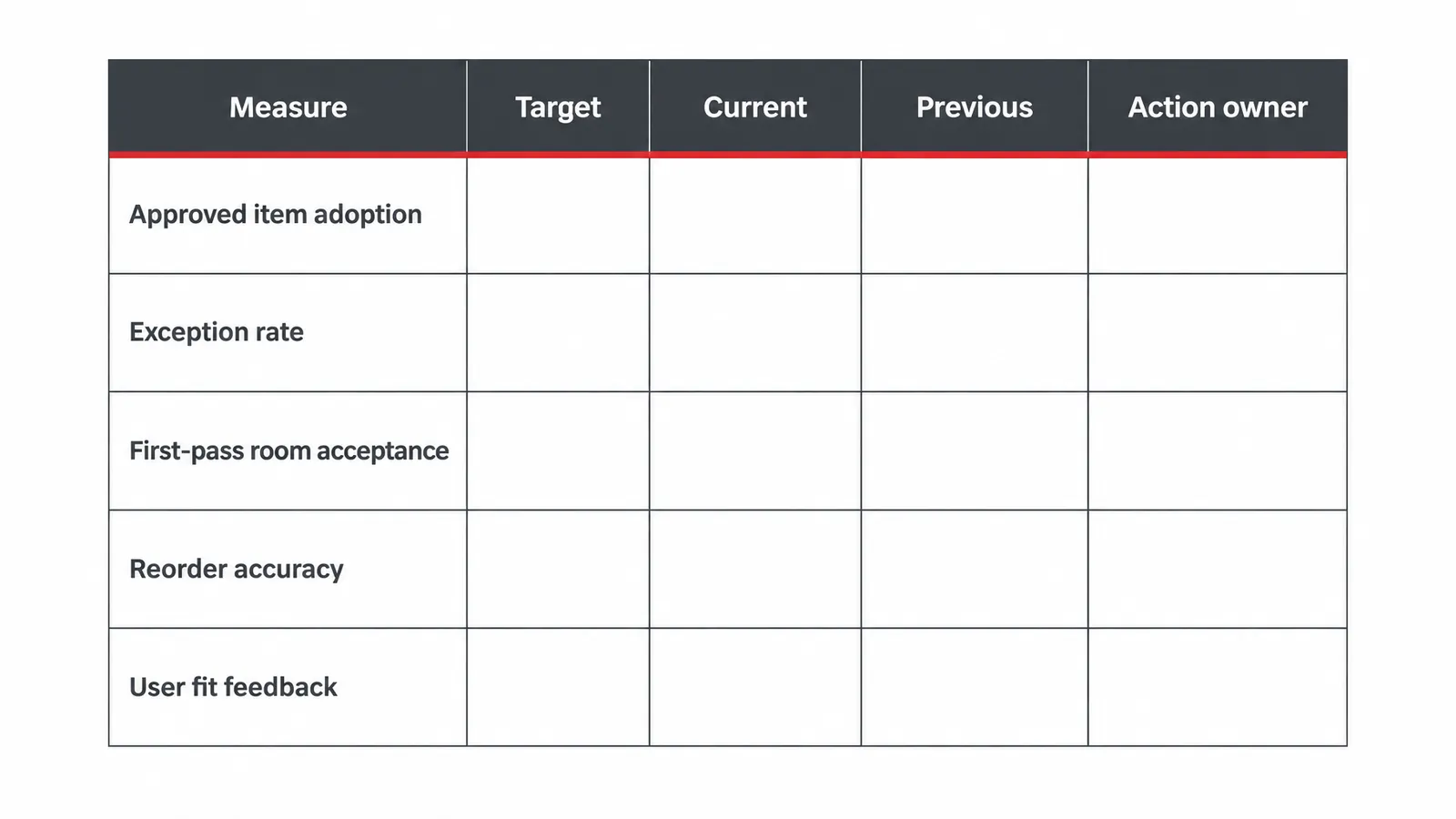
Use consistent definitions when comparing results between offices.
- Approved-item adoption: share of purchased items that match the current master schedule.
- Exception rate: number of deviations per project, separated by reason and location.
- First-pass acceptance: rooms accepted without an outstanding furniture or technical defect.
- Reorder accuracy: share of repeat orders that use the correct configuration and finish.
- Warranty and service response: cases opened, acknowledged and resolved under the written terms.
- User fit feedback: issues reported after a defined period of normal use.
The measures need context. A high exception rate at a single site may be caused by an unusual building, while an increase across every office may point to a weak specification. A low defect count is useful only if the inspection process is consistent and teams report issues honestly.
Review the standard when a product is discontinued or a warranty term changes. Review it when a new technical need appears or the same exception keeps coming back. Keep a version history so procurement can see which schedule applied to each order.
What should you do next?
Appoint one standard owner and create a location register for every office. Start with the most frequently repeated work settings, then agree the core specification and the technical interfaces with the people who will use, maintain and support the space.
For a first release, choose one representative site and pilot the standard before issuing a wider order. Record what worked, what needed an exception and what should change in the master schedule. Confirm the European ordering allowance where it applies and ask Office Design to confirm installation time and the scope available for each destination.
For background on the business, see the Office Design company profile. For a project spanning Almaty and Astana, provide the room register, floor plans, item schedule and IT/AV brief. Confirm the exact support available for each site before it appears in the procurement plan.
Frequently asked questions
How do you create a company-wide furniture standard?
Start by defining the offices and work settings in scope. Map the user tasks, specify approved products and configurations, set finishes and alternatives, add IT/AV interfaces, pilot the result and establish an exception process. Name one owner and keep the master schedule under version control.
What should an office furniture standard include?
Include product identity, model or code, configuration, size, dimensions, finish, room use, accessories, warranty territory, installation notes and replacement rules. Add approved alternatives, technical interfaces, supporting drawings and the person who can approve a deviation.
How can a standard work across Almaty and Astana?
Keep the common product specification and procurement rules consistent. Add a site survey for each building and allow documented changes for access, floor geometry or technical constraints. Confirm delivery and installation scope for each city separately, rather than assuming one location’s arrangements apply to the other.
How should procurement approve an equivalent product?
Compare it with the approved item using written criteria for dimensions, function, configuration, finish, warranty, service, ergonomics and IT/AV compatibility. Request product documents and samples where needed. Record the approver, reason, impact and review date in the exception register.
When should IT and AV approve the furniture specification?
Before the specification is frozen and before procurement releases the order. IT/AV should confirm power, data, display mounting, cable routes, equipment locations and testing responsibilities. The final room plan and technical schedule should agree.
How often should a company review its furniture standard?
Review it after a major installation and on a fixed governance cycle chosen by the organisation. Reopen it when a product is discontinued, terms change, a new technical requirement appears or repeated exceptions show that the current rules no longer fit.
Does a standard remove the need for local delivery planning?
No. A standard improves product and document consistency, while each site still needs an access survey, delivery slot, handover plan and confirmed installation scope. Building restrictions and local service availability should be checked for every destination.
Set the first release of your furniture standard
Share the location register, room types and current furniture schedule with Office Design. Ask the team to discuss the workplace brief and confirm the services it can support for each site.
Office Design Team
Workplace specialists, Office Design, Office Design
Office Design specialists in Almaty plan, furnish and install corporate offices and supply Herman Miller and MillerKnoll furniture. PLACEHOLDER: replace with a named specialist and bio before the first publish (strategy: every article is reviewed by an Office Design specialist).
Read the full profile
Keep reading
- Office Design services
- Office Design projects
- Framery and Silen acoustic booths
- Herman Miller planning ideas
Sources
- Herman Miller: Planning ideas and tools (accessed 2026-10-31)
- Herman Miller: Aeron technical specifications (accessed 2026-10-31)
- Framery: Framery Six technical specifications (accessed 2026-10-31)
- Herman Miller: Warranty and service (accessed 2026-10-31)
- Framery: Framery One technical specifications (accessed 2026-10-31)